Thursday, 2 February, 2012

Innovation = Android + course à pieds !


En tant que techno-geek, coureur et amateur de sports d'endurance, il a été difficile pour moi de passer à côté d'une fusion entre technologie de type tablette et ... un tapis de course à pieds.

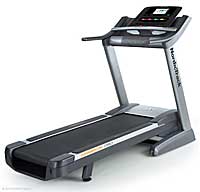
Quelques impressions après quelques mois d'utilisation du tapis de course "NordickTrack Commercial 1750 édition 2012.

Quand l'hiver frappe le Québec, ce qui arrive tous les ans, il est parfois difficile de se motiver à aller dehors surtout lorsque les conditions sont de type pluie/neige/glace ou alors carrément glissante. Avec un emploi du temps chargé, s'entraîner à la course peut donc devenir un véritable déplaisir/obligation ce qui n'est pas forcément souhaitable sur le long terme. Ainsi, ma charmante épouse et moi nous sommes mis en demeure d'acheter un tapis de course à pieds.

Internet à la rescousse et voici que nous sélectionnons et installons (ce qui ne fut pas une mince affaire : 150kg de machinerie à descendre sans trop la casser dans le garage). Réparation des pots cassés (les attaches d'un capot qui avaient sauté) puis se rendre compte que, à l'étape 2 (sur 50) nous avons oublié de brancher un fil (le fil de terre), perçage sauvage d'un autre trou et finalement branchement de a masse.

Me voici prêt à faire mes premiers km sur cette machine que je qualifie déjà, d'infernale ;-)

Au niveau des caractéristiques : 3.5 HP en continu, grande surface de course (1m50 de long), ventilateur et hauts-parleurs intégrés mais, ce qui rend tout geek heureux et lui donne envie de courir sur place : une tablette Android de 7 pouces en lieu et place du traditionnel et triste panneau de contrôle !

Sans réseau sans fil, on a les programmes normaux d'un tapis de course soit 30 programmes répartis en vitesse, calorie, montée, manuel. Le tapis lui même a  de très bonnes caractéristiques comme :
  • pente jusqu'à -3 degrés (légère descente) et +15 degrés (du step quoi!)
  • vitesse de 18 km/h maximum de 18km/h 
Les programmes peuvent être utilisés via les touches de la console de contrôle ou via la tablettes. À l'usage, l'interface tactile de la tablette l'emporte : elle est très simple à utiliser, même en courant et avec une relative imprécision.


Là ou les choses deviennent intéressante c'est une fois connecté à un réseau sans file et après avoir créé un compte "iFit.com". Une fois enregistré, il est possible de faire de la "réalité virtuelle" en courant sur votre tapis. L'usage de base est de faire, via google maps, votre parcours partout sur la planète et ... de le courir ensuite. En fonction de votre vitesse, la position est calculée et la pente ajustée en temps réel et vous pouvez suivre votre position sur la carte. Il est possible de faire des compétitions virtuelles avec d'autres personnes connectées sur iFit.

Personnellement, la fonction que je préfère est la suivante : il est possible de passer en mode "Street View" lorsque vous courrez. De cette manière, vous voyez vraiment l'endroit ou vous êtes. Je me suis ainsi amusé à faire :
  • le marathon de Boston
  • une course que nous faisons souvent à Sherbrooke (les trois ponts)
  • course à New York, San Francisco , le Cap, Paris
Bref, avec cette vue on est vraiment capable d'expérimenter et de voir le parcours de tout parcours ce qui est vraiment intéressant.

Je trouve donc que l'ajout de cette fonction est un sérieux plus qui permet de voyager en courant dans son garage. Du point de vue du compétiteur : je trouve cela vraiment utile de pouvoir me familiariser avec le marathon de Boston sans avoir à y aller auparavant : c'est un sérieux plus. La possibilité de pouvoir programmer ses parcours usuels (à Sherbrooke) permet de réaliser des entraînement à environnement contrôlé ou tout est reproductibles et  mesurable.

Le tapis vient avec une cardiofréquencemètre, prise USB pour musique, un brower dans la tablette mais aussi un an de garantie (pièce) et deux ans sur la main d'oeuvre ce qui est appréciable. Je conseille donc ce tapis à toutes celles et ceux qui souhaitent une plate-forme évolutive (iFit évolue assez vite et souvent), rompre la monotonie des entrainement sur tapis en voyageant via google streetview, avoir accès à des entrainements reproductibles en tout temps.


En conclusion, nul doute que ces outils de ce type vont se généraliser et que, alors que l'on retrouve des tablettes android à 25$, la plupart des consoles de contrôle de nos appareils usuels vont se métamorphoser en composant de type tablette Android. D'ailleurs, il y a déjà des frigo Samsung android !

Ubiquité des réseaux, ubiquité de l'intelligence qui devient de moins en moins chère : que reste t'il à l'être humain ?

Sunday, 29 January, 2012

Random Ubuntu notes to install ASUS Zenbook UX31

I'm experiencing with the ASUS Zenbook (UX31) and Ubuntu.

This is a technical entry to, maybe, help others install Ubuntu on this machine.
Please read the great community documentation here : https://help.ubuntu.com/community/AsusZenbook

I did some things a bit differently.
  • Use alternate USB boot (64 bit) to have an encrypted LVM
  • You will need to add "nomodeset" to the grub option (video/casper/whatever not functional otherwise!)
A different /etc/default/grub to have more battery saving kernel option. Be careful here, I read and integrated some hints from the LKML. Playing with the devil here ;-)


Here are the options I use :


GRUB_CMDLINE_LINUX_DEFAULT="intel_iommu=off i915.modeset=1 i915.i915_enable_fbc=1 i915.lvds_downlclock=1 i915.i915_enable_rc6=1 i915.semaphores=1 pcie_aspm=force"

Don't forget to run
update-grub

I use slightly different options for the touchpad. Please see the script here http://pastebin.com/RdmrcwdY

I use the latest kernel (not stable) for the future Ubuntu release :


uname -a 
Linux Elrond 3.3.0-030300rc1-generic #201201191835 SMP Thu Jan 19 23:36:54 UTC 2012 x86_64 x86_64 x86_64 GNU/Linux


DMESG : http://pastebin.com/0mgnnnU3


LSPCI : http://pastebin.com/CGHcK0ja

LSUSB -V : http://pastebin.com/tianPnHf

Monday, 8 August, 2011

La guerre civile numérique

La guerre civile numérique


Note au lecteur : la maison d'édition m'a gentillement fourni un exemplaire du livre à condition que j'en écrive une revue. Pour cause de déménagement je n'ai reçu le livre que récemment et profité de mes vacances pour écrire ce billet.

Il me faut cependant attendre que le texte soit publié avant de le mettre en ligne, cela ne devrait pas tarder !!

Sunday, 7 November, 2010

Why Wayland is good for the future of Ubuntu, Canonical, etc.

History
 
The recent announce at UDS about the fact that the venerable X server & protocols will not be the default choice for Unity and as a consequence Ubuntu was a shock for some, it is clearly a relief for me.

In my precedent post about Unity, (before the UDS/Wayland announcement) I said "In this context, Ubuntu/Canonical is more conservative than Apple and Google that decided to dump X altogether. I'm not sure the X environment is fitted for next millennium challenges : once again, time will tell."

Obviously, the X server and protocol are great tools, very mature and with numerous capabilities. For a long time, evolution was slow, some would say "frozen" but then X.org did a great job and things started to evolve again.

However, being in the field, deploying X-based thin-clients since 2003 and designing larger scale and user friendly open source thin client solution (LTSP-Cluster) made me wonder if this was a protocol fitted for the future.

Why not X ?
Without being a X expert, some of the issues that were critical in the (announced) move from X server to Wayland

Hardware support : I strongly recommend to run Linux only on hardware with a well supported video driver : without a well supported driver, the experience can be daunting, especially on a thin-client. X was supposed to be hardware independent, lightweight and provide great performance.

However these fights had been lost long ago : I've learned the hard way that not all X drivers are equals : open-source or not, how many XV channels are supported, 3D (what version exactly, etc.). In fact, selecting good quality desktop or thin-client hardware is a service we sold to our customers !

Size matters : a default X.org server, on my desktop where I wrote this blog is 64Mb (without cache), 180Mb (with cache) on a Ubuntu 10.10, 64 bit with regular 3D effects. Well, on a phone with 256Mb or RAM or on an ARM based thin client with 64Mb, this is not good. I can imagine it also has an impact on battery life on the mobile devices.

A toolbox instead of a simple tool : Without being "bloated", it is certain that X has evolved, along the year, to support a huge number of hardware, protocols and has a long history and has a load of quirks and "this is not a bug, it is a feature" type of functionality.

Crispiness : X is not very crisp. Without being a usability expert, I can guarantee that, in my experience on iPad, Mac, Android device, those devices are much more responsive graphically than your average Linux desktop. Why ? I'm no X expert but I will propose the hypothesis that this is because of the legacy of the project.

3D : Without discussing the time it took to obtain 3D support at the X level, remember the Compiz/Beryl/Looking Glass and the time it took for them to mature while most of the X user where despising the efforts ? How well is 3D integrated into your desktop environment ?

Why Wayland ?

Most of the reasons don't have anything to do with Wayland and are consequences of the present IT competitive environment, the current state of X as well as business needs.  In this context, we will see that Wayland happened to be exactly what was needed : instead of starting from scratch a start-up project, hosted by freedesktop.org, an existing proof of concept and prototype, an already existing but small community with the goal to improve user experience.

My first reason is a practical one : I think that in order to make X evolves to a state suited for Mobile Internet Devices (MID) it request a deep technical knowledge of X as well as a long time to really convince all the X shareholders to agree to a change. Will the market wait for this change : I'm sure it will not ! Will everyone agree to the need to change : not certain either. Can a company accept this level of risk for what is their future ? According to Wikipedia, X11 dates back to 1984. Is it possible and wise to compete in this space with a technology that is 26 years old : I really don't think so (I'm saying this with a profound respect to everybody that contributed to the X11 project : the fact that it was great for 20+ years, in IT, is clearly a tribute to the design and the project itself).

Another way to look at this is the "disruptive innovation" or "disruptive technology" model. Mobile Internet Devices are changing the IT world ... big time. Major players are on the verge of becoming irrelevant in a new market that is growing faster than any other market in IT. Think about the position of RIM, Blackberry, PalmOS, Microsoft, etc. in this market space ? Others are sizing (creating?) the opportunity and went from losers/non-existent to key players (Apple with the iPod, iPhone, iPad and, of course, Google with Android). In order to compete in this space, legacy has to be left behind : your average MID does not share a lot in common with your desktop : UI of every single application has to be re-designed in order to take into account : screen size, touch screen, multi-touch, no mouse/keyboard, battery consumption, etc.

Wayland goals are the following (according to Wikipedia) "every frame is perfect, by which I mean that applications will be able to control the rendering enough that we'll never see tearing, lag, redrawing or flicker".

Well, in term of goal, it really puts the user in the center of things : a display manager that provide a great user experience. Ubuntu is popular on the desktop because it really put efforts into design and decided to place the user in the center of things.

Conclusion

Well, it is always interesting when a decision you were expecting happens. In a sense, I'm pleased and excited because it is the only way to compete and provide an open-source solution in the MID market and, why not, somehow piggybacking on the desktop market.

While Android could have been a possible choice, choosing Android will have constraint Ubuntu/Canonical to ... follow innovation, not to drive innovation. Also, Android has some issue, especially if you value the open-source development model where all the doors are open for the community to join and participate.


All in all, my only reserve is with the timing : if Wayland is ready in one year from now, it means a 2-4 years of delay compared to, let's say, Google and Android. More than this with Apple. In this context, the question is : Is it too late ?

Evolution and revolution are and will be needed in order for Open Source to continue to be relevant. This is particularly true in a disruptive market like the MID market. The announce was certainly a great way to launch one. History will tell if will succeed : I really hope it will and I really encourage the Open Source community to see the big picture out there, regroup and, ultimately, to contribute as much as possible to Wayland & Unity in order to make it a first class open source citizen able to run on any MID device and on any desktop.

Wednesday, 27 October, 2010

Why Unity is good for the future of Ubuntu, Gnome, Canonical, etc.

Desktop and windows manager

A few month ago I already blogged about "the end of the (Linux) desktop as we know it." I will not blatantly repost this entry but draw some conclusions linked to the recent adoption of Unity for the default Ubuntu desktop.

My conclusion was the following : "At a certain level, one can say that the battle is already lost : the current desktop environments can not really fight this war as they don't own the key technology : the browser. As a consequence, the risk, for them (Gnome, KDE, etc.) is to be a tool that will launch a browser. A (relatively) simple tool that can be easily changed with almost no user impact..."

The recent announcement at UDS confirm that this road is the one chosen by Ubuntu. Now the question is why and what benefits for the key players here : Canonical, Ubuntu, Gnome and, of course, the users.

Mobile Internet Devices (MID) = application delivery

The new hardware platforms (most of them ARM based, touch-screen based, with small screen and no keyboards) rely extensively on the cloud/web based application and deploy specific small size applications on every connected MID.

The "desktop" on those platforms is very different from the one on your regular  "old-school" computer : it consists mainly of giant dock with widgets and your most used apps and a task-bar that informs you about communications (tweet, email, voice mail, etc.) and the MID status (wifi, phone, battery, etc.).

Most of the regular desktop applications are barely usable on such a device : do you think that Open Office user experience will be great on a 640x480 screen with no keyboard ? All those applications are now somehow "legacy" and given the specific user interaction with the MID and the MID capabilities (touch screen, multi-touch, accelerometer, low computing power, etc.) can not be used, with a great user experience, on those devices. Even the most "cross-platform" software, the browser, is specific to the MID device and every major player rolled out a specific version (lighter, snappier, etc.) for those platform.

So can we use the legacy application, yes. Will they succeed "as is" on those MID : I don't think so.

Can a MID platform succeed on the desktop ?

Well, this is the interesting question. Ubuntu/Canonical decided to bet on it. In fact, instead of synchronizing your desktop to your MID, why not consider your desktop as ... a very large MID ?

Apple did it the other way around, Microsoft as well bu they both come from the old desktop world. Google did it from Android for MID to a hypothetical GoogleOS that will certainly be very similar to your Android experience.

Ubuntu/Canonical is betting on the fact that users will follow them from the MID market to the desktop market. This is an interesting challenge and a really disruptive choice : let's break compatibility with the past and embrace this new way of delivering applications.

Will it succeed : only time, users and the market can tell ;-)

Impact on key players : gnome, Ubuntu/Debian, Canonical, users

Well, as I announced it in my precedent post, the legacy of the desktop environment out there is too cumbersome to carry on this new trendy market. Nokia (QT, Symbian, Meego) , Google (Android), Apple and Canonical came to the same conclusion : they can not build on top of those legacy windows environment (most of the time : because they have to serve a community of developers and users that care only about the "old" desktop model) : they had to start from scratch for the user interface. However, they kept some very useful and precious components like the kernel, basic OS, etc..

In this context, Ubuntu/Canonical is more conservative than Apple and Google that decided to dump X altogether. I'm not sure the X environment is fitted for next millennium challenges : once again, time will tell.

Gnome : I think this is a great news. Leveraging the tools, library and previous applications, a new "shell" can be developed that will be perfectly suited for MID. This, I can imagine that innovation can flow more freely from Desktop to MID and vice versa. Will Gnome developers embrace this change ? Will it provoke a community meltdown ? This is more an ego risk than a technological or business one. FLOSS is famous for its ego war and this may be the greatest risk for this key-player.

Ubuntu/Debian : Well, this really open another market for this distribution. A strong differentiator compared to RedHat, Novell. Competition on this market is called Android. Not an easy one to take on...

Canonical : As far as I know, the OEM division will have another great product to sell ! Just look at sales figures from Apple and Android device. This look very interesting to me. As the third or fourth player (Apple, RIM, Google, ...), becoming leader in this market will be a real challenge. Two very closed platform, two very open platforms. A huge and very fast growing market.

Users : Choice is always beneficial to some degree. As the default desktop environment will change, we will see the adoption rate but I expect it to be quite large in the Ubuntu community. This is a well known tactics (anyone remember Microsoft embedding IE into the desktop ?) that has worked well in the past. Also, it will help "convergence", namely the unification of your desktop and MID environment ... through the cloud services that will be offered on this platform (Music, More content, Storage, Contact, Preferences, ...).

Conclusion

All in all, I think this is great news for the future of Linux and all the involved party (Gnome, Ubuntu/Debian, Canonical and Mr. User). My only concerns are linked to some possible ego-war into the Gnome community and the fact that this will "only" be a tertiary platform in term of applications and content delivery : RIM seems in trouble, Apple the clear gorilla and Android the strong challenger. Will the great marketing and community/viral effect of Ubuntu be able to modify the race results ?