Monday, June 18, 2012

Windows keyblet : no disruptive innovation, still not open source...

Introduction 

This post is based on various sources and discussion that occurred in the last weeks with various IT professionals and people interested in Cloud, Mobile device, open source and innovation.

One of the sources is this article from the Wall Street Journal : http://online.wsj.com/article/SB10001424052702303703004577474910029263198.html

Well, of course a keyblet is a fusion between a tablet and a keyboard. While the keyblet is presented by Microsoft as an innovation, we will see that it is not the case and that it will fail to offer a great experience both for PC/keyboard users and for touch-screen devices *touchlets?*.

What is disruptive innovation ?

I met M. Christensen at a conference three years ago. The conference was about (disruptive) innovation and education. I then read "Disruptive Class" and then most of his books and I will use his definition from his website :
www.claytonchristensen.com/disruptive_innovation.html

"An innovation that is disruptive allows a whole new population of consumers access to a product or service that was historically only accessible to consumers with a lot of money or a lot of skill.  Characteristics of disruptive businesses, at least in their initial stages, can include:  lower gross margins, smaller target markets, and simpler products and services that may not appear as attractive as existing solutions when compared against traditional performance metrics."

In this article, I will refer to smartphones, tablets and future "touch" based interface as a disruptive innovation in the word of telecom first (do you remember Nokia ? Blackberry ?). This disruptive innovation then, start eating the PC market at home first and will, in the near future in the enterprise.

Why having a Keyboard is bad for (disruptive) innovation


The real disruptive innovation about smart-things (phones, tables, future thingy, etc.) is about the touch screen interface and the cloud. They have no keyboard. That's part of their DNA.

In the meantime, Microsoft sit on the PC market and they are busy developing keyboard compatible devices. Too bad for them, excellent for the competition !

Either the keyboard is optional : in this case, why do you have to travel with it and include it in your device. Or the keyboard is mandatory : then why having a touch screen ?

How can you make slick interfaces for applications with and without keyboard ?

Microsoft will spend a good part of their developer time to square the circle. Not possible. Google and Apple do not spend a single development cycle about those problems : that's "old world" problem. They are busy trying to invent another way to input data : Apple with Siri, Google with voice search, IBM with Watson (of Jeopardy fame), etc. Believe me, it will not be a "Keyblet".

Trying to bridge the old and new world will make every single user unhappy and they know it : they want only happy users from the new world.


Why killing your lifetime partners is very bad

Microsoft never ever designed and sold computers. To the best of my knowledge, they designed and sold the Xbox, the Zune (iPod killer, remember ?) and then some keyboards and mice.

They were careful to work with partners like HP, Dell, etc. for the core device : the PC. Now, this type of alliance will be more and more complex as the market for smart devices is expected to dwarf the PC market in the next few years. Also, I expect other players to avoid the "Keyblet" type of device ... forever.

Anyway, you can now expect a very different song from the lifetime partners of Microsoft. They will negociate the Windows tax on the PC and will be way more open to ... open source alternative (Apple is as closed as a company can be!).

The race is open and it is every man for himself...

Why betraying your lifetime chipset maker is very bad too

The wintel couple is not a myth. It was a long time and well established market strength on the PC market. On the touchlet market, Intel is invisible as both Android and Apple used ARM based devices dominate the market (>90%).

Of course, from a competitive point of view, it makes a lot of sense for Microsoft to use ARM-based CPUs and a very special "Windows RT". However, I'm sure that this is considered by Intel as the most profound betrayal : decades of collaboration and market ruling are at stakes and Microsoft just lost another long time partner.

What will Intel do ? I'm not sure but it looks like ARM is now invading the PC and thin client market as well (See those wonderful new HP with thin-client + screen power by POE : http://www.techworld.com.au/article/424203/hp_unveils_ethernet-powered_thin_client/ )

What about Linux & Open Source ?

Well, like the XBox before, I expect this device to be rooted really quickly once it will be available on the market. Will a more open platform help ? Maybe but everything I wrote on this post will apply as well to a Linux-based Microsoft keyblet : trying to mix old technology and a real disruptive innovation is not possible. Geeks will certainly enjoy this platform and have some pride to run Linux on a real Windows keyblet. I do not expect Linux and Open Source to change this keyblet fate...

Conclusion

On the superficial side (appearance, design, etc.), I'm pretty certain the keyblet is amazing and excellent.

I'm very skeptical about the ecosystem : developers and applications. This is the real key to world domination and Microsoft has changed every development toolkit in favor of more HTML-ish development kit that is not at all familar to MS developers. Also, they are a _very_ late entrant on the market : Apple has more than 600 000 apps and google more than 400 000. Why spend time learning a new platform ?

On a deeper level, here are the messages that Microsoft is sending to the market and his partners :
  • To PC makers : game over. It is every man for himself now. We are now playing the same game and we just became a serious competitor. I expect this to open the market for Linux on the PC side because those major PC players do not feel respected by Microsoft anymore and I also expect those PC makers to transition to Android or a homegrown platform instead of Windows (Dell and HP in particular).
  • To Intel : sorry guys. We love you but now, we are using ARM too. Too bad you can not make as simple and power efficient chips. We can not wait anymore and we will let the market decide. I don't know what Intel will do as Microsoft is certainly a big part of their ecosystem. They should certainly focus on the touchlet market. I hope it is not too late for them...
Finally, Microsoft can not play the same game as Google and Apple : they have to support a stupid keyboard for every app that will be available for this device. They will, as a consequence, completely miss the touch revolution and remain prisoners of the outdated keyboard paradigm.

Long live the keyblet and may I be wrong (for Microsoft!).

Thursday, February 2, 2012

Innovation = Android + course à pieds !


En tant que techno-geek, coureur et amateur de sports d'endurance, il a été difficile pour moi de passer à côté d'une fusion entre technologie de type tablette et ... un tapis de course à pieds.

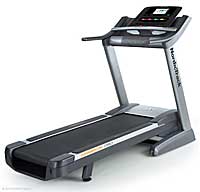
Quelques impressions après quelques mois d'utilisation du tapis de course "NordickTrack Commercial 1750 édition 2012.

Quand l'hiver frappe le Québec, ce qui arrive tous les ans, il est parfois difficile de se motiver à aller dehors surtout lorsque les conditions sont de type pluie/neige/glace ou alors carrément glissante. Avec un emploi du temps chargé, s'entraîner à la course peut donc devenir un véritable déplaisir/obligation ce qui n'est pas forcément souhaitable sur le long terme. Ainsi, ma charmante épouse et moi nous sommes mis en demeure d'acheter un tapis de course à pieds.

Résumé d'un entrainement
Internet à la rescousse et voici que nous sélectionnons et installons (ce qui ne fut pas une mince affaire : 150kg de machinerie à descendre sans trop la casser dans le garage). Réparation des pots cassés (les attaches d'un capot qui avaient sauté) puis se rendre compte que, à l'étape 2 (sur 50) nous avons oublié de brancher un fil (le fil de terre), perçage sauvage d'un autre trou et finalement branchement de a masse.

Me voici prêt à faire mes premiers km sur cette machine que je qualifie déjà, d'infernale ;-) [ajout : voici quelques photos d'écran pour illustrer cette revue]


Au niveau des caractéristiques : 3.5 HP en continu, grande surface de course (1m50 de long), ventilateur et hauts-parleurs intégrés mais, ce qui rend tout geek heureux et lui donne envie de courir sur place : une tablette Android de 7 pouces en lieu et place du traditionnel et triste panneau de contrôle !

Sans réseau sans fil, on a les programmes normaux d'un tapis de course soit 30 programmes répartis en vitesse, calorie, montée, manuel. Le tapis lui même a  de très bonnes caractéristiques comme :
  • pente jusqu'à -3 degrés (légère descente) et +15 degrés (du step quoi!)
  • vitesse de 18 km/h maximum de 18km/h 
Les programmes peuvent être utilisés via les touches de la console de contrôle ou via la tablettes. À l'usage, l'interface tactile de la tablette l'emporte : elle est très simple à utiliser, même en courant et avec une relative imprécision.


Carte du parcours dessinée auparavant sur google
maps ou téléchargée sur iFit.com
Là ou les choses deviennent intéressante c'est une fois connecté à un réseau sans file et après avoir créé un compte "iFit.com". Une fois enregistré, il est possible de faire de la "réalité virtuelle" en courant sur votre tapis. L'usage de base est de faire, via google maps, votre parcours partout sur la planète et ... de le courir ensuite. En fonction de votre vitesse, la position est calculée et la pente ajustée en temps réel et vous pouvez suivre votre position sur la carte. Il est possible de faire des compétitions virtuelles avec d'autres personnes connectées sur iFit.

La vue "StreetView"
Personnellement, la fonction que je préfère est la suivante : il est possible de passer en mode "Street View" lorsque vous courrez. De cette manière, vous voyez vraiment l'endroit ou vous êtes. Je me suis ainsi amusé à faire :
  • le marathon de Boston
  • une course que nous faisons souvent à Sherbrooke (les trois ponts)
  • course à New York, San Francisco , le Cap, Paris
Bref, avec cette vue on est vraiment capable d'expérimenter et de voir le parcours de tout parcours ce qui est vraiment intéressant.

Pour bien illustrer le tout, une petite vidéo :


Je trouve donc que l'ajout de cette fonction est un sérieux plus qui permet de voyager en courant dans son garage. Du point de vue du compétiteur : je trouve cela vraiment utile de pouvoir me familiariser avec le marathon de Boston sans avoir à y aller auparavant : c'est un sérieux plus. La possibilité de pouvoir programmer ses parcours usuels (à Sherbrooke) permet de réaliser des entraînement à environnement contrôlé ou tout est reproductibles et  mesurable.

Le tapis vient avec une cardiofréquencemètre, prise USB pour musique, un brower dans la tablette mais aussi un an de garantie (pièce) et deux ans sur la main d'oeuvre ce qui est appréciable. Je conseille donc ce tapis à toutes celles et ceux qui souhaitent une plate-forme évolutive (iFit évolue assez vite et souvent), rompre la monotonie des entrainement sur tapis en voyageant via google streetview, avoir accès à des entrainements reproductibles en tout temps.


En conclusion, nul doute que ces outils de ce type vont se généraliser et que, alors que l'on retrouve des tablettes android à 25$, la plupart des consoles de contrôle de nos appareils usuels vont se métamorphoser en composant de type tablette Android. D'ailleurs, il y a déjà des frigo Samsung android !

Ubiquité des réseaux, ubiquité de l'intelligence qui devient de moins en moins chère : que reste t'il à l'être humain ?

Sunday, January 29, 2012

Random Ubuntu notes to install ASUS Zenbook UX31

I'm experiencing with the ASUS Zenbook (UX31) and Ubuntu.

This is a technical entry to, maybe, help others install Ubuntu on this machine.
Please read the great community documentation here : https://help.ubuntu.com/community/AsusZenbook

I did some things a bit differently.
  • Use alternate USB boot (64 bit) to have an encrypted LVM
  • You will need to add "nomodeset" to the grub option (video/casper/whatever not functional otherwise!)
A different /etc/default/grub to have more battery saving kernel option. Be careful here, I read and integrated some hints from the LKML. Playing with the devil here ;-)


Here are the options I use :


GRUB_CMDLINE_LINUX_DEFAULT="intel_iommu=off i915.modeset=1 i915.i915_enable_fbc=1 i915.lvds_downlclock=1 i915.i915_enable_rc6=1 i915.semaphores=1 pcie_aspm=force"

Don't forget to run
update-grub

I use slightly different options for the touchpad. Please see the script here http://pastebin.com/RdmrcwdY

I use the latest kernel (not stable) for the future Ubuntu release :


uname -a 
Linux Elrond 3.3.0-030300rc1-generic #201201191835 SMP Thu Jan 19 23:36:54 UTC 2012 x86_64 x86_64 x86_64 GNU/Linux


DMESG : http://pastebin.com/0mgnnnU3


LSPCI : http://pastebin.com/CGHcK0ja

LSUSB -V : http://pastebin.com/tianPnHf

Monday, August 8, 2011

La guerre civile numérique

La guerre civile numérique


Note au lecteur : la maison d'édition m'a gentillement fourni un exemplaire du livre à condition que j'en écrive une revue. Pour cause de déménagement je n'ai reçu le livre que récemment et profité de mes vacances pour écrire ce billet.

Il me faut cependant attendre que le texte soit publié avant de le mettre en ligne, cela ne devrait pas tarder !!

Sunday, November 7, 2010

Why Wayland is good for the future of Ubuntu, Canonical, etc.

History
 
The recent announce at UDS about the fact that the venerable X server & protocols will not be the default choice for Unity and as a consequence Ubuntu was a shock for some, it is clearly a relief for me.

In my precedent post about Unity, (before the UDS/Wayland announcement) I said "In this context, Ubuntu/Canonical is more conservative than Apple and Google that decided to dump X altogether. I'm not sure the X environment is fitted for next millennium challenges : once again, time will tell."

Obviously, the X server and protocol are great tools, very mature and with numerous capabilities. For a long time, evolution was slow, some would say "frozen" but then X.org did a great job and things started to evolve again.

However, being in the field, deploying X-based thin-clients since 2003 and designing larger scale and user friendly open source thin client solution (LTSP-Cluster) made me wonder if this was a protocol fitted for the future.

Why not X ?
Without being a X expert, some of the issues that were critical in the (announced) move from X server to Wayland

Hardware support : I strongly recommend to run Linux only on hardware with a well supported video driver : without a well supported driver, the experience can be daunting, especially on a thin-client. X was supposed to be hardware independent, lightweight and provide great performance.

However these fights had been lost long ago : I've learned the hard way that not all X drivers are equals : open-source or not, how many XV channels are supported, 3D (what version exactly, etc.). In fact, selecting good quality desktop or thin-client hardware is a service we sold to our customers !

Size matters : a default X.org server, on my desktop where I wrote this blog is 64Mb (without cache), 180Mb (with cache) on a Ubuntu 10.10, 64 bit with regular 3D effects. Well, on a phone with 256Mb or RAM or on an ARM based thin client with 64Mb, this is not good. I can imagine it also has an impact on battery life on the mobile devices.

A toolbox instead of a simple tool : Without being "bloated", it is certain that X has evolved, along the year, to support a huge number of hardware, protocols and has a long history and has a load of quirks and "this is not a bug, it is a feature" type of functionality.

Crispiness : X is not very crisp. Without being a usability expert, I can guarantee that, in my experience on iPad, Mac, Android device, those devices are much more responsive graphically than your average Linux desktop. Why ? I'm no X expert but I will propose the hypothesis that this is because of the legacy of the project.

3D : Without discussing the time it took to obtain 3D support at the X level, remember the Compiz/Beryl/Looking Glass and the time it took for them to mature while most of the X user where despising the efforts ? How well is 3D integrated into your desktop environment ?

Why Wayland ?

Most of the reasons don't have anything to do with Wayland and are consequences of the present IT competitive environment, the current state of X as well as business needs.  In this context, we will see that Wayland happened to be exactly what was needed : instead of starting from scratch a start-up project, hosted by freedesktop.org, an existing proof of concept and prototype, an already existing but small community with the goal to improve user experience.

My first reason is a practical one : I think that in order to make X evolves to a state suited for Mobile Internet Devices (MID) it request a deep technical knowledge of X as well as a long time to really convince all the X shareholders to agree to a change. Will the market wait for this change : I'm sure it will not ! Will everyone agree to the need to change : not certain either. Can a company accept this level of risk for what is their future ? According to Wikipedia, X11 dates back to 1984. Is it possible and wise to compete in this space with a technology that is 26 years old : I really don't think so (I'm saying this with a profound respect to everybody that contributed to the X11 project : the fact that it was great for 20+ years, in IT, is clearly a tribute to the design and the project itself).

Another way to look at this is the "disruptive innovation" or "disruptive technology" model. Mobile Internet Devices are changing the IT world ... big time. Major players are on the verge of becoming irrelevant in a new market that is growing faster than any other market in IT. Think about the position of RIM, Blackberry, PalmOS, Microsoft, etc. in this market space ? Others are sizing (creating?) the opportunity and went from losers/non-existent to key players (Apple with the iPod, iPhone, iPad and, of course, Google with Android). In order to compete in this space, legacy has to be left behind : your average MID does not share a lot in common with your desktop : UI of every single application has to be re-designed in order to take into account : screen size, touch screen, multi-touch, no mouse/keyboard, battery consumption, etc.

Wayland goals are the following (according to Wikipedia) "every frame is perfect, by which I mean that applications will be able to control the rendering enough that we'll never see tearing, lag, redrawing or flicker".

Well, in term of goal, it really puts the user in the center of things : a display manager that provide a great user experience. Ubuntu is popular on the desktop because it really put efforts into design and decided to place the user in the center of things.

Conclusion

Well, it is always interesting when a decision you were expecting happens. In a sense, I'm pleased and excited because it is the only way to compete and provide an open-source solution in the MID market and, why not, somehow piggybacking on the desktop market.

While Android could have been a possible choice, choosing Android will have constraint Ubuntu/Canonical to ... follow innovation, not to drive innovation. Also, Android has some issue, especially if you value the open-source development model where all the doors are open for the community to join and participate.


All in all, my only reserve is with the timing : if Wayland is ready in one year from now, it means a 2-4 years of delay compared to, let's say, Google and Android. More than this with Apple. In this context, the question is : Is it too late ?

Evolution and revolution are and will be needed in order for Open Source to continue to be relevant. This is particularly true in a disruptive market like the MID market. The announce was certainly a great way to launch one. History will tell if will succeed : I really hope it will and I really encourage the Open Source community to see the big picture out there, regroup and, ultimately, to contribute as much as possible to Wayland & Unity in order to make it a first class open source citizen able to run on any MID device and on any desktop.